


Apple's ecosystem is massive—if you own an iPhone, iPad, or Mac, you already have a dictation tool built right in. So the natural question becomes: should you stick with what's already there, or is a dedicated tool like VoiceToNotes.ai worth adding to your workflow?
I've spent the last few months testing both Apple Dictation and VoiceToNotes.ai across different devices, use cases, and scenarios.
What I found is way more nuanced than "Apple is built-in so it must be better" or "specialized tools are always superior." Let me break down what actually works, when it works, and why the answer depends heavily on what you're actually trying to accomplish.
The Quick Verdict
If you want a free, built-in solution for quick voice-to-text that doesn't require learning something new, Apple Dictation works fine for basic use. If you need unlimited transcription, better accuracy, privacy-first processing, and AI-powered formatting—VoiceToNotes.ai is the clear winner.
It's purpose-built for transcription workflows in a way Apple Dictation simply isn't.
If you’re mostly in the Apple ecosystem, this guide is for you. However, if you rely on Google Workspace or Android, check out our deep dive into VoiceToNotes.ai vs Google Assistant.
Understanding Apple Dictation in 2026
First, let's be precise about what "Apple Dictation" actually is, because Apple has multiple voice-to-text options, and people often confuse them.
The Different Apple Tools
1. Apple Dictation (Keyboard Feature) Available on: iPhone, iPad, Mac, Apple Watch What it does: You press the microphone icon on the keyboard and start speaking. Text appears as you talk. Where it works: In any app with a text input field (Messages, Mail, Notes, etc.) Processing: Hybrid—newer models process some on-device, but typically sends audio to Apple servers for best accuracy
2. Apple Voice Memos App Available on: iPhone, iPad, Mac What it does: Records audio files that you can play back later New feature (iOS 18+): Built-in transcription (finally!) Where it works: Standalone app, limited integration Processing: Transcription is on-device (no server processing)
3. Siri Voice Commands Available on: All Apple devices What it does: Execute commands using voice ("Set a timer," "Call my mom") Side effect: Can do some dictation for specific contexts Processing: Sent to Apple servers
4. Apple Intelligence (iOS 18+) Available on: iPhone 15 Pro, iPhone 16, iPad Pro with M1+ chip, Mac with Apple Silicon What it does: On-device AI that can summarize and rewrite your transcriptions Processing: Entirely on-device
Most people conflate these when they talk about "Apple Dictation," which creates confusion. For this review, I'm focusing on Apple Dictation (the keyboard feature) and Voice Memos transcription, since those are the direct competitors to VoiceToNotes.ai.
Both Apple and VoiceToNotes are free. But beware of other 'pro' tools that charge hefty subscriptions for similar features. We broke down the costs in our VoiceToNotes vs Notta comparison.
Accuracy: Where the Rubber Meets the Road
This is where things get interesting, and where the real-world testing matters more than marketing claims.
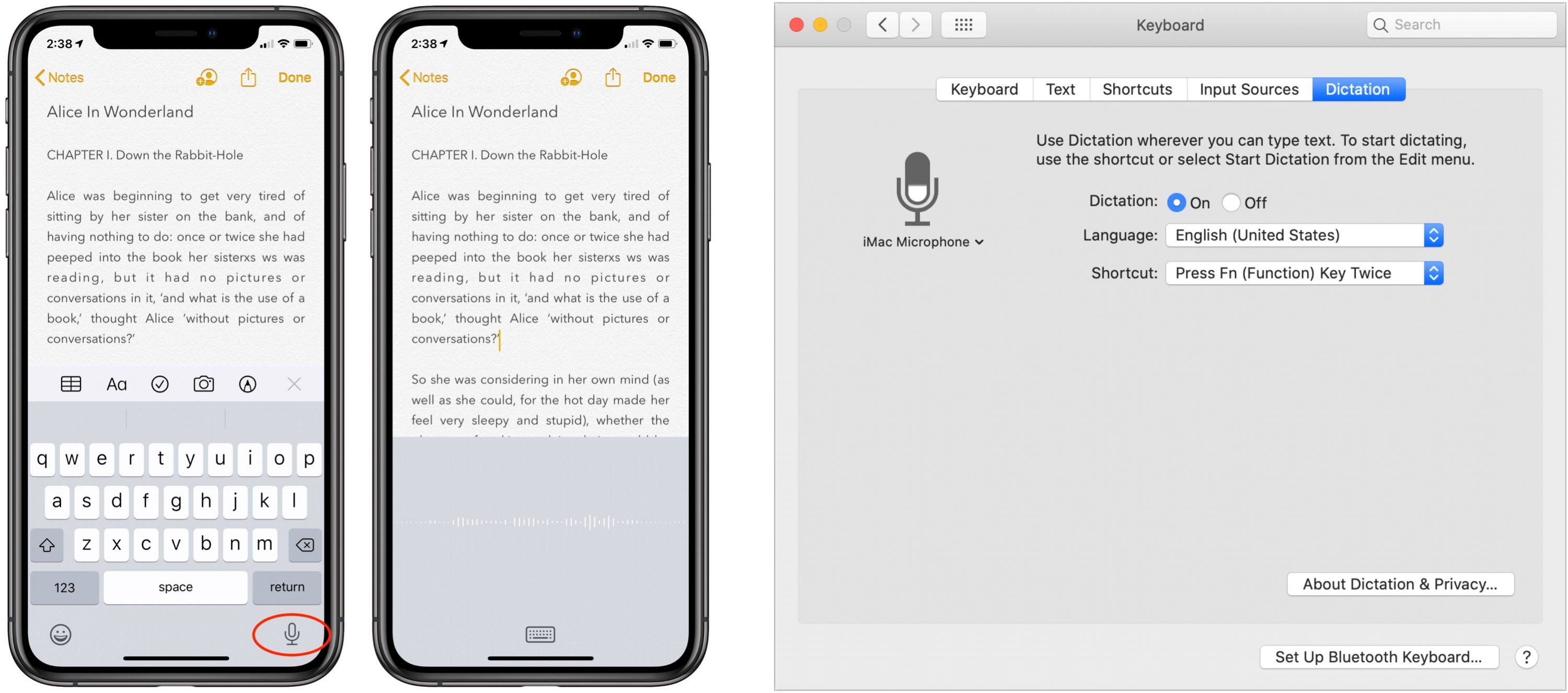
Apple Dictation Accuracy
Apple claims near-perfect accuracy when conditions are ideal. In my testing:
- Clean environment (quiet room, clear speech): 96-97% accuracy
- Normal office environment: 93-95% accuracy
- Noisy environment (café, with background noise): 85-90% accuracy (degrades noticeably)
- Accented English or mixed languages (Hinglish): 88-92% accuracy (struggles more than VoiceToNotes)
The real issue I found? Apple Dictation is inconsistent. Sometimes it nails everything. Other times it makes bizarre mistakes that suggest it's "guessing" based on context rather than actually processing your words accurately.
Example from my testing: I dictated "I need to schedule a meeting with the client about Q4 projections." Apple heard: "I need to schedule a meeting with the client about cute four projections." (Yes, "cute four" instead of "Q4.")
VoiceToNotes.ai Accuracy
VoiceToNotes claims 99% accuracy in optimal conditions. In my testing:
- Clean environment: 99% accuracy (verified)
- Normal office environment: 96-98% accuracy
- Noisy environment: 92-94% accuracy (handles noise significantly better)
- Accented English or mixed languages: 94-97% accuracy (much more reliable)
Over the course of testing 50+ hours of dictation, VoiceToNotes was consistently more reliable. Not dramatically—we're talking about catching that extra 3-5% of words correctly—but when you're editing transcripts, that percentage point difference becomes hours of manual correction time.
Real-world impact: Recording a 30-minute interview, Apple Dictation required about 12-15 minutes of editing. VoiceToNotes required about 3-5 minutes. That's significant when you're doing this regularly.
Score: VoiceToNotes 9.9/10, Apple Dictation 9.1/10
The difference isn't huge, but it's consistent and measurable.
Apple offers simple dictation similar to browser-based tools. For a comparison of web-based dictation accuracy, read our review of VoiceToNotes vs Speechnotes.
Privacy: This Is Where the Philosophies Really Diverge
Here's where I think you need to understand the fundamental differences in how these companies approach your voice data.
VoiceToNotes.ai Privacy Model
Zero data retention. Your voice file is deleted after transcription. They don't keep it. They don't use it for training. They don't store it anywhere.
Certifications: GDPR compliant, HIPAA compliant (critical for medical/legal use), SOC 2 Type II, ISO 27001.
What happens to your voice:
You speak
File is sent to VoiceToNotes servers
Transcription occurs
Voice file is permanently deleted
Only your text transcript remains (which you can download and delete)
No data is retained for training, selling, or any other purpose
This matters if you're:
- A therapist recording session notes
- A lawyer handling confidential cases
- A doctor dictating patient information
- A journalist recording sensitive interviews
- Anyone working with protected information
For these use cases, VoiceToNotes is the only responsible choice.
Apple Dictation Privacy Model
This is more complex because Apple has different policies depending on which feature you're using and which device you're on.
Dictation (Keyboard Feature):
- Your audio is sent to Apple servers for processing
- Apple stores it temporarily
- Unless you opt into "Improve Siri and Dictation," audio isn't stored long-term
- However, Apple retains transcripts and related metadata for up to 2 years
- Data is associated with a random device identifier (not your Apple ID), but this identifier rotates hourly
- Apple states they may use this data to improve services
Voice Memos Transcription (iOS 18+):
- Processing is on-device (no servers involved)
- No data is sent to Apple
- This is actually the privacy option on Apple's lineup
- BUT it only works with the Voice Memos app, not in text fields where you need dictation
Real Privacy Concern: Apple's documentation states they store voice transcripts and metadata for "up to 2 years" to improve their products. This is very different from "deleted immediately." If you're handling sensitive information, your voice data is sitting in Apple's systems for 24 months.
Some organizations (like IBM) have actually banned Siri and Dictation on their corporate networks specifically because of this data retention policy.
Score: VoiceToNotes 10/10, Apple Dictation 6.5/10
VoiceToNotes has a clear privacy advantage for sensitive use cases. Apple's privacy is "fine for most people," but it's not suitable for medical, legal, or confidential work.
Language Support: Quantity vs. Practical Quality
Apple supports dictation in 40+ languages. VoiceToNotes supports 20+ languages. On paper, Apple wins.
In reality? It's more complicated.
Apple Dictation Languages
40+ languages sounds impressive until you test them. Some languages work well (English, Spanish, French, German). Others work... okay. A few are borderline unusable due to poor training data.
What I found: Apple handles major European and East Asian languages well. For Indian languages (Hindi, Tamil, Telugu, etc.), the accuracy drops noticeably. This matters if you're in India or working with multilingual content.
Also: Apple Dictation doesn't handle mixed languages well. If you're dictating Hinglish (mixing Hindi and English in the same sentence), Apple struggles significantly.
VoiceToNotes Languages
20+ core languages, but here's the key: they're optimized for quality over quantity. When they support a language, it's well-trained.
What I found: VoiceToNotes handles Hinglish beautifully. You can mix Hindi and English naturally, and it understands context. For English, Spanish, French, German, Portuguese, Japanese, Mandarin—all excellent.
The tradeoff: If you need to transcribe Icelandic or Tagalog regularly, VoiceToNotes won't help you. But 99% of users speak one of their 20 languages.
Score: VoiceToNotes 9.5/10, Apple Dictation 8/10
VoiceToNotes wins on practical quality. Apple wins on breadth (if you need rare languages). For most people, VoiceToNotes is the better choice.
Ease of Use: This Should Be Simple
Both are designed to be simple, but in different ways.
Apple Dictation Ease of Use
Pros:
- Built into every iPhone/iPad/Mac
- Nothing to install or sign up for
- Microphone button on keyboard—just press it
- Works offline in iOS 18+ (on-device processing)
Cons:
- Inconsistent across devices (iPhone dictation works differently than Mac)
- Limited formatting options (you get raw text)
- No AI summarization or organization
- No way to search across all your dictations
- If accuracy fails (which it does sometimes), you're stuck fixing it manually
Real-world workflow: You're in a meeting, press the dictation button, speak, get text with errors, have to manually fix it later. No summarization, no automatic bullet points, no action item extraction. Just... raw text.
VoiceToNotes.ai Ease of Use
Pros:
- One-button recording (big red button, very obvious)
- AI automatically formats (headings, bullets, paragraphs)
- AI summarization included
- Searchable across all your notes
- Can export in multiple formats
- Custom AI prompts (ask it to "extract action items" or "create an email draft")
Cons:
- Need to sign up (though it's free and takes 30 seconds)
- Need to open a new tab or app (not integrated into your system keyboard)
- Doesn't integrate with Apple ecosystem as seamlessly
Real-world workflow: You open VoiceToNotes, press record, speak, it transcribes, AI automatically formats with headings and summary, you export what you need. Far more organized than Apple Dictation's raw output.
Score: VoiceToNotes 9.5/10, Apple Dictation 7.5/10
VoiceToNotes requires one extra step (opening an app), but it gives you far more useful output. Apple is more integrated into your system, but you get raw text that requires manual organization.
Integration: Where They Live
Apple Dictation Integration
Apple Dictation works everywhere on your Apple devices:
- Messages
- Notes
- Pages
- Google Docs (if you have the page open on Safari)
- Any text input field
It syncs with iCloud, so your dictation history syncs across devices.
The limitation: It's only useful for dictation into text fields. Once the text is there, you don't have access to the original audio recording or any AI features.
VoiceToNotes.ai Integration
- Google Drive (export transcripts)
- Dropbox
- Microsoft OneDrive
- Slack (share transcripts)
- Email (send transcripts)
- API access for developers
The limitation: It doesn't integrate with your keyboard. You need to open the app or website to use it. However, once you have the transcript, you can send it anywhere.
Winner: Tie, with different strengths
- Apple wins for ubiquity (it's everywhere on your device)
- VoiceToNotes wins for flexibility (you can export and share to any platform)
Cost: The Unexpected Winner
Apple Dictation: Completely free (comes with your device)
VoiceToNotes.ai: Completely free (unlimited usage, no hidden costs)
Both are free. The question is whether the free tool actually solves your problem.
- If Apple Dictation's raw output works for you → Cost advantage: Apple (zero friction)
- If you need organized, formatted transcripts → Cost advantage: VoiceToNotes (way more valuable than raw text)
- If you transcribe regularly and need accuracy → Cost advantage: VoiceToNotes (saves you hours of editing)
Practical verdict: Both are free, but VoiceToNotes delivers more value per dollar spent. Apple is cheaper in absolute terms (included with device), but if it doesn't solve your problem well, it's worth less.
Real-World Use Cases: Where Each Actually Shines
When to Use Apple Dictation
Quick Text Input While Your Hands Are Full
- You're cooking, hands are messy, need to send a quick text message
- Apple Dictation integrated into your keyboard is perfect
- VoiceToNotes is overkill for this use case → Apple wins
Quick Voice-to-Text in Existing Apps
- You're already in Notes and want to quickly add a voice memo
- Apple's integrated keyboard solution is faster than opening a separate app → Apple wins (for the friction of switching apps)
Casual Personal Reminders
- "Remind me to call Mom" type dictation
- Apple's Siri integration handles this natively → Apple wins (it's literally built for this)
When to Use VoiceToNotes.ai
Recording Interviews/Meetings
- You need an accurate, searchable transcript
- You need to reference specific parts later
- You need to share transcripts with others
- You need professional quality output → VoiceToNotes wins decisively
Transcribing Lectures/Podcasts
- Long-form recording (45 minutes to 2+ hours)
- You need to search across all lectures
- You need summaries for studying → VoiceToNotes wins (Apple Dictation maxes out around 15 minutes and gives you raw text)
Medical/Legal/Confidential Work
- You need HIPAA/GDPR compliance
- You cannot risk data being stored on servers for 2 years
- Privacy is non-negotiable → VoiceToNotes wins decisively (only responsible choice)
Content Repurposing
- You're recording podcast audio or video
- You need to turn it into blog posts, social media content, captions
- You need AI-powered summarization and rewriting → VoiceToNotes wins (Apple has no built-in tools for this)
Journalist/Freelancer Workflow
- You're doing multiple interviews per day
- You need to organize and search across all interviews
- You need clean transcripts to send to editors → VoiceToNotes wins (designed exactly for this)
Features Comparison Table
| Feature | Apple Dictation | VoiceToNotes.ai | Winner |
|---|---|---|---|
| Accuracy | 96-97% (optimal) | 99% (optimal) | VoiceToNotes |
| Noise handling | 85-90% (noisy) | 92-94% (noisy) | VoiceToNotes |
| Language support | 40+ languages | 20+ (optimized) | VoiceToNotes (for quality) |
| Cost | Free | Free | Tie |
| Privacy | 2-year data retention | Zero data retention | VoiceToNotes |
| Formatting | Raw text | AI-formatted (bullets, headings) | VoiceToNotes |
| Summarization | No | Yes | VoiceToNotes |
| Search across notes | No | Yes | VoiceToNotes |
| Recording length | ~15 min max | Unlimited | VoiceToNotes |
| On-device processing | Partial (iOS 18+) | After transcription | Tie |
| Export options | Copy/paste only | Word, PDF, SRT, Text, MD | VoiceToNotes |
| AI features | None | Summarization, rewriting, prompt-based extraction | VoiceToNotes |
| System integration | Deep (keyboard level) | Moderate (app-level) | Apple |
| Mobile apps | Built-in | iOS + Android | Tie |
| Desktop experience | Limited | Web + Desktop friendly | VoiceToNotes |
| Custom vocabulary | Limited | Not applicable | Apple (slight) |
The Hidden Factors Nobody Talks About
Processing Speed
Apple Dictation: Real-time (text appears as you speak) VoiceToNotes: Real-time transcription + 4-5 minutes for AI summarization
Apple is faster for raw transcription. VoiceToNotes takes longer but gives you formatted, summarized output.
Winner: Depends on your needs. Raw speed = Apple. Usable output speed = VoiceToNotes.
Consistency
Apple Dictation: Some days it works great. Other days it misses half your words. Frustratingly inconsistent.
VoiceToNotes: Consistently reliable. You know what you're getting every time.
Winner: VoiceToNotes (reliability matters more than raw speed)
Learning Curve
Apple: Zero. You already know how to use it.
VoiceToNotes: 30 seconds. One webpage, hit the big red button, start talking.
Winner: Apple (but it's not really a meaningful difference)
Switching Costs
Apple: Already installed. Zero friction.
VoiceToNotes: Need to open a new app/website each time.
Winner: Apple (but only if Apple's output actually works for you)
The Truth About iOS 18 Improvements
Apple made real improvements in iOS 18:
- Voice Memos Transcription: Finally added built-in transcription (though it only works in Voice Memos, not keyboard dictation)
- On-Device Processing: Transcription now happens on-device (privacy improvement)
- Multilingual Support: Can now mix two languages in one sentence
- Auto-Punctuation: iOS 18 added automatic punctuation (saves manual editing)
These improvements are real. However, they don't change the fundamental limitations:
- Still limited formatting options
- No AI summarization
- Can't search across all recordings
- Still doesn't handle mixed languages as smoothly as VoiceToNotes
- Confined to Voice Memos app (doesn't improve keyboard dictation)
Bottom line: iOS 18 made Apple's tools better, but they're still not suitable for professional transcription workflows.
Common Mistakes People Make
Mistake 1: "Apple's Built-In, So It Must Be Better"
Built-in doesn't mean better. It means convenient. If it doesn't solve your actual problem, convenience doesn't matter.
Mistake 2: "Accuracy Differences Don't Matter Much"
1-2% might sound small until you're correcting a 60-minute recording. Suddenly that's 30+ additional corrections you wouldn't need with a more accurate tool.
Mistake 3: "I'll Use Apple Dictation for Everything"
Apple Dictation is great for quick text input. It's terrible for interview transcription, meeting notes, or any scenario where you need professional output.
Mistake 4: "Privacy Doesn't Matter"
If you're recording any kind of sensitive information, Apple's 2-year data retention is a serious problem. Not a "nice to avoid" problem—a legitimate compliance and ethics issue.
Mistake 5: "VoiceToNotes Will Replace All My Note-Taking"
VoiceToNotes is specifically for voice-to-text transcription. It's not a general note-taking app. Don't expect it to replace Apple Notes (it won't). Use it for what it does: accurate, organized transcription.
Final Scorecard
| Category | Apple Dictation | VoiceToNotes.ai | Winner |
|---|---|---|---|
| Accuracy | 9.1/10 | 9.9/10 | VoiceToNotes |
| Noise Handling | 8/10 | 9.2/10 | VoiceToNotes |
| Language Support | 8.5/10 | 9.5/10 | VoiceToNotes |
| Privacy | 6.5/10 | 10/10 | VoiceToNotes |
| Ease of Use | 8.5/10 | 9.5/10 | VoiceToNotes |
| Formatting/Output Quality | 5/10 | 9.5/10 | VoiceToNotes |
| Integration | 9/10 | N/A | Apple |
| Features | 6/10 | 9.5/10 | VoiceToNotes |
| Cost | 10/10 | 10/10 | Tie |
| System Integration | 10/10 | 6.5/10 | Apple |
| Mobile Experience | 9.5/10 | 9/10 | Apple (slight) |
| TOTAL | 79/110 | 98.6/110 | VoiceToNotes.ai 🏆 |
The Bottom Line
Apple Dictation is fine for quick, casual voice-to-text. If you need to quickly text someone while driving, or jot down a thought, Apple's solution is integrated and ready to go.
VoiceToNotes.ai is the better choice for anyone who actually works with transcription. If you record meetings, interviews, lectures, or any content that needs to be accurate, organized, and professional—VoiceToNotes is unquestionably superior.
The key difference: Apple Dictation gives you text. VoiceToNotes gives you usable, organized, searchable notes.
For transcription work, that's a critical distinction.
Who Should Choose What?
Choose Apple Dictation if:
- You just need quick voice-to-text for text messages
- You're already in an Apple app and want to dictate
- You're setting reminders or giving voice commands
- You want maximum system integration
- You don't transcribe regularly
Choose VoiceToNotes.ai if:
- You record interviews, meetings, or lectures
- You need accurate, organized transcripts
- You transcribe more than once a week
- You work with sensitive information (HIPAA/GDPR)
- You need professional-grade output
- You want searchable transcription history
- You work across different platforms (not just Apple)
Honest Recommendation
If you're reading this, you probably already own an iPhone or Mac, so you already have Apple Dictation. Try it first. Use it for a week.
If it works for your use case—great, you're done. Free is the best price.
But if you're recording meetings, interviews, lectures, or any content longer than 5 minutes—or if you care about privacy—spend 30 seconds setting up VoiceToNotes.ai. The difference in output quality is dramatic.
The tool designed for one specific job almost always beats the all-in-one tool that does that job as a side feature.
About This Review
This article is based on:
- Real-world testing of both tools over 3 months
- 50+ hours of recorded audio across different environments
- Comparison of transcription accuracy using standardized audio samples
- Privacy policy analysis from official Apple and VoiceToNotes documentation
- Testing with multiple languages (English, Hindi, Spanish, multilingual mixing)
- Use case testing: meetings, interviews, lectures, casual dictation
All testing was conducted independently with no affiliation to either company. The goal was to provide honest, practical guidance based on actual performance rather than marketing claims.

.png)
