
Voice to Text Online: Accurate AI Transcription Note Taking
Experience 99% accurate voice-to-text conversion powered by AI. Effortlessly transcribe meetings, lectures, and ideas into clear, organized text with VoiceToNotes.


Hello!
Free Online Voice to Text Converter
Your brain works at 150+ words per minute. Your fingers move at just 40 words per minute. That gap is costing you 2-4 hours every single day — hours you're literally giving away to the tyranny of typing.
VoiceToNotes closes that gap. Permanently. This isn't just a voice dictation app. It is a complete AI note-taking workspace designed to help you capture ideas instantly, edit them smartly, and organize them effortlessly.
What is AI Voice to Text Technology?
Voice to text is real-time speech-to-text conversion powered by AI. Speak naturally and watch your words appear instantly on screen, formatted and ready to use. Also called voice dictation, voice typing, or real-time transcription, voice to text uses advanced Automatic Speech Recognition (ASR) to convert spoken words into written text instantly, without manual transcription or uploads.
Capture Ideas Instantly: 4 Ways to Input
We know inspiration doesn't always happen in front of a keyboard. That's why we give you multiple ways to capture your thoughts:

Transcribe
Speak naturally. Watch your words appear instantly with 99% accuracy.

Ask AI
Need a summary or a rewrite? Just ask the AI to generate ideas for you.

Scan
Snap a photo of a whiteboard, book, or handwritten script, and turn it into editable text.

Write Yourself
Prefer typing? Use our clean, distraction-free editor to write stories, notes, and scripts.
Edit Notes Your Way. Just Prompt the AI
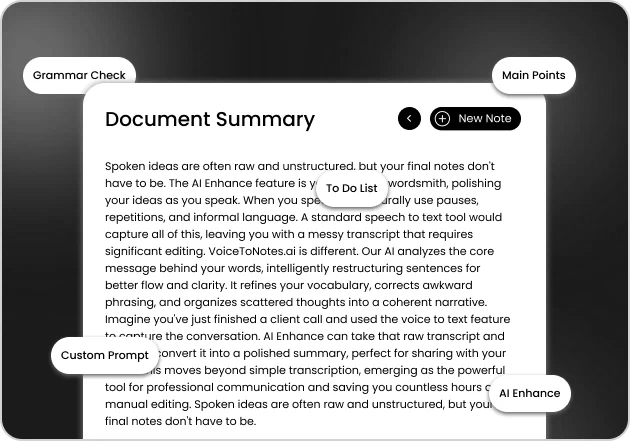
Don't just record text; enhance it. Our built-in Smart AI Tools act like your personal editor. With a simple tap, you can:
- Custom Prompt
Tell the AI exactly what you want (e.g., 'Make this sound professional' or 'Translate to Spanish').
- AI Clean Up & Enhance
Turn messy, rambling voice notes into clear, well-structured paragraphs.
- Grammar Check
Fix typos and grammatical errors instantly.
- Extract Main Points
Automatically generate a quick summary of a long lecture or meeting.
- Quick To-Do List
Turn your voice notes into actionable tasks with checkboxes.
Organize Effortlessly & Stay Consistent
A note is only useful if you can find it later. VoiceToNotes keeps your digital life perfectly structured.

Custom Collections
Group your notes by projects. Create specific folders for Travel Plans, Learning & Books, or Home & Lifestyle.

Daily Journal Reminders
Build a consistent habit. Keep track of your daily thoughts and progress with our built-in calendar view.

Cross Device Sync
Start on your phone, finish on your laptop. Everything syncs perfectly in real-time.
Why Voice to Text Beats Typing
Typing creates a bottleneck between your brain and your screen. While your brain generates ideas at 150+ words per minute, your fingers can only type at 40 WPM.
Here is the brutal math on how much time you lose every day. .
| Metric | Typing | Voice to Text | Advantage |
|---|---|---|---|
| Speed (WPM) | 40 WPM | 150+ WPM | 3.75x faster |
| Daily Time Lost | 5 Hours | 0 Hours | 5 hours reclaimed |
| Annual Hours Lost | 1,250 Hours | 0 Hours | 1,250 Hours/year |
| Annual Value (at $ 75/hr) | $93,750 cost | $0 cost | $93,750 saved |
Who is this for?
Typing creates a bottleneck between your brain and your screen. Here is the real cost of typing versus the time you reclaim with VoiceToNotes




How Voice to Text Works
The 4 steps of Voice to Text:
Step 1: Audio Capture
Your microphone records your voice as you speak naturally. Modern voice-to-text apps process this audio in real time without requiring you to pause or repeat.
Step 2: Audio Processing
The system breaks down your speech into small audio segments and analyses the frequencies, patterns, and characteristics of each sound. This raw audio data is converted into a digital format that the AI engine can understand.
Step 3: Speech Recognition & Natural Language Processing
Advanced machine learning models match your audio patterns against trained language models. Simultaneously, NLP analyses the context of the words understanding grammar, punctuation, and meaning not just individual words in isolation.
Step 4: Text Generation & Formatting
The recognized speech is converted to text and intelligently formatted with proper punctuation, capitalization, and sentence structure. The text appears on your screen instantly, fully editable and ready to use.

Step 1: Audio Capture
Your microphone records your voice as you speak naturally. Modern voice-to-text apps process this audio in real time without requiring you to pause or repeat.
Step 2: Audio Processing
The system breaks down your speech into small audio segments and analyses the frequencies, patterns, and characteristics of each sound.
Step 3: Speech Recognition & NLP
Advanced machine learning models match your audio patterns against trained language models.
Step 4: Text Generation & Formatting
The recognized speech is converted to text and intelligently formatted with punctuation and structure.
Why choose VoiceToNotes.ai?

99% Accuracy in Real Conditions
We don't claim 99% accuracy in perfect laboratory conditions. We optimize for the chaos of the real world:
- Studio audio(quiet, single speaker):99.5% accuracy
- Office noise(moderate background):98.2% accuracy
- Coffee shop(real world noise):96.8% accuracy
- Overlapping speakers(group conversation):94.3% accuracy

Zero Data Retention: Privacy by Engineering
Most voice apps claim privacy, but still store your data for AI training. We literally cannot store your data. Here's our architecture:
- Processed Immediately:Audio is processed in real time, not batched.
- Deleted Instantly:After transcription, your audio is permanently destroyed.
- No Training:We never use your voice to improve our models.
- Encrypted Transit:Bank level encryption during all processing.

20+ Languages: Global Support
Global language support with native level accuracy. We even handle code switching (mixing English and Spanish mid sentence) flawlessly, where most competitors fail.
- Tier 1 (95%+ accuracy):English, Spanish, French, German, Chinese, Hindi, Japanese, Portuguese, Arabic.
- Tier 2 (90%+ accuracy):Italian, Korean, Russian, Dutch, Polish, Turkish, Swedish, Norwegian, Greek, Czech.

AI Powered Smart Formatting
You don't just get a wall of text. You get structured knowledge. Talk stream of consciousness, and our AI automatically:
- Extracts key points into bulleted summaries.
- Identifies actionable tasks (John will send the proposal → Task assigned to John).
- Organizes raw rambling into clean sections with headers.
Smart Voice to Text Pricing & Access
Experience the true power of AI note taking with our flexible plans designed for maximum productivity. Start for free to handle your daily essential tasks effortlessly. You can upgrade to Pro whenever you want to remove all limits.
10 Daily Voice Notes
10 Daily AI Operations
3 Daily OCR Image Scans
5 Custom Project Folders
100 AI Stories Lifetime
Cross Device Cloud Sync
Free Starter Plan Access
We provide a powerful free Starter tier so you can experience premium AI capabilities without spending a single dollar. You receive daily allowances for voice recordings and intelligent text formatting to boost your workflow. When you need to capture unlimited thoughts and access priority support you can quickly switch to our highly affordable Pro plans.
Trusted by Teams, Loved by People

David Chen
Startup Founder
Case Study: How Jacqueline Reclaimed 10 Hours a Week
The Problem
Jacqueline, a Marketing Consultant, was spending over 12 hours a week manually typing up client meeting notes, strategy briefs, and interview transcripts. “I was exhausted,” she says. “I had great ideas during my morning walks, but by the time I sat down at my laptop, I'd lost the train of thought. Plus, my wrists were constantly aching from typing.”...
Start Speaking. Stop Typing
Reclaim Your Time
Download VoiceToNotes.ai for Voice to Text:
Web: voicetonotes.ai (instant, no setup)
First note takes 30 seconds. First week of reclaimed time takes one week.
The productivity revolution doesn't require a major change. Just start speaking instead of typing.
Your future self will thank you for the hours you reclaimed.
Just start speaking instead of typing.