

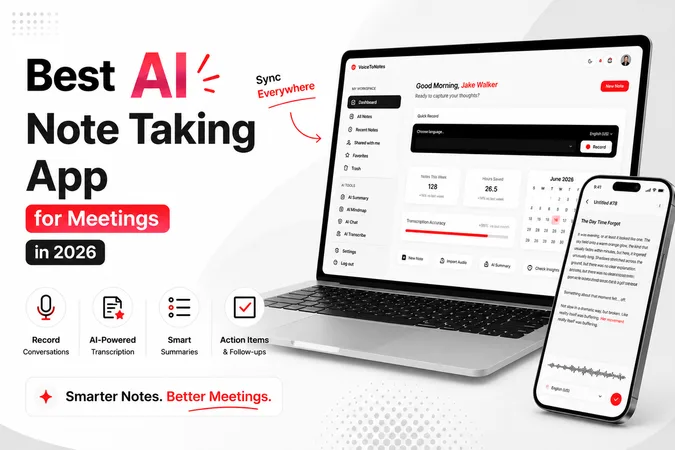
I often found myself spending more time taking notes and it was difficult keeping track of key points, tasks and follow-up actions after each meeting. This led me to look for an automatic note-taking AI solution.
Over the past three months, I have tried and tested seven of the most popular AI note taking apps for meetings: VoiceToNotes.ai, Otter AI, Fireflies.ai, Fathom, Granola, Notta, and Jamie.
How I Tested These AI Note Taking Apps
I tested each AI note-taking app across:
• Client meetings
• Internal team discussions
• Sales calls
• Planning sessions
• Multi-speaker conversations
I evaluated each tool based on transcription accuracy, AI summary quality, action item extraction, ease of use, integrations, and overall value for money.
I tested these ai note taking apps during live meetings and analyzed them by assessing transcription accuracy, AI generated summaries, user friendliness, integration capabilities and value for money.
This review is going to reveal what I found out and which AI note-taking app I am going to use in 2026 for meetings.
What Makes a Great AI Note Taking App for Meetings?
While analyzing different AI note-taking tools for meetings, these are the features that matter most.
1. Accurate Transcription – Record conversations with high accuracy even in noisy environments.
2. Summarization Capability – Automatically creates summaries out of lengthy meetings.
3. Action Items – Identifies and lists down actionable items from conversations.
4. Meetings Integration – Works well with other video calling platforms such as Zoom, Google Meet, and Microsoft Teams.
5. Ease of Use– Easy to implement and will not disrupt your workflow.
6. Value for Money – Offers useful features without costing too much.
A great note-taking tool helps people save time when summarizing a meeting's output.
Quick Comparison of the best AI note taking app for meetings
Before we dive deep, here’s a simple breakdown of the top AI note taking tools for meetings.
| Tools | Best For | Platforms | Starting Price | Website |
|---|---|---|---|---|
| VoiceToNotes.ai | Organized meeting notes & AI Summaries | Web,Android & iOS | $1.49/month | VoiceToNotes.ai |
| Otter AI | Team collaboration & meeting notes | Web, iOS, Android | $16.99/month | otter.ai |
| Fireflies.ai | Sales team & business meetings | Web | $10/month | Fireflies.ai |
| Fathom | Client calls & sales meetings | Web | $15/month | fathom.ai |
| Granola | Simple & clean meeting notes | macOS | $18/month | granola.ai |
| Notta | Multilingual meetings | Web, Windows, Mac, iOS, Android | $9/month | notta.ai |
| Jamie | Privacy-focused meeting notes | Windows, Mac | €24/month | meetjamie.ai |
Important Note: The pricing mentioned in this article is based on information available at the time of writing. Since software companies frequently update their plans and features, make sure to visit the official website of your preferred tool before subscribing to confirm the latest pricing and available features.
Transcription Accuracy Test Results
Over three months, I tested these AI note-taking apps across client meetings, team discussions, and planning sessions. While results varied depending on audio quality and speaker clarity, these were my average observations.
| Tool | Estimated Accuracy |
|---|---|
| VoiceToNotes.ai | 95% |
| Otter AI | 93% |
| Fireflies.ai | 92% |
| Fathom | 91% |
| Notta | 91% |
| Jamie | 90% |
| Granola | 89% |
Note: Accuracy may vary depending on microphone quality, background noise, speaker accents, and internet connectivity.
Disclaimer: These figures are based on my personal testing experience and should not be considered official benchmarks published by the respective companies.
Detailed Breakdown of the Best AI Note Taking Apps for Meetings
After using these tools for weeks, here's what stood out
1. VoiceToNotes.ai – The Standout Choice AI note taking app for meetings
VoiceToNotes.ai stood out because it offered me an efficient solution to turn the long conversation into organized notes immediately.
What I got was not a bunch of unstructured pages with text but well-organized notes including summaries, highlights and action points.
Example:
After a 45-minute client call, I received a clear summary within minutes, no manual editing required. Pros:
- Excellent real-time transcriptions
- Well-structured AI-based summaries
- Actionable items highlighted
- Support multiple languages
- Reasonably priced among competitors
Cons:
- Stable internet connection required
- Advanced functionality needs a subscription
My verdict - If you want to spend more time executing actions and less time on analyzing your notes, VoiceToNotes.ai delivered the most balanced combination of transcription accuracy, AI summaries, and action item extraction during my testing.
Check the pricing details here, https://voicetonotes.ai/pricing/
2. Otter AI - Best ai note taking app for Team Collaboration
Otter AI has been in use for several years and is considered a reliable brand that specializes in AI meeting notes. Its main advantage does not lie in transcription but rather in collaboration.
Otter AI allows multiple users to share, edit and discuss their notes together in one place.
For example:
While discussing their sales report in a weekly meeting, team members would be able to add some remarks and make clarifications to what had been discussed earlier without creating duplicates of the same file.
Pros:
- High-quality transcription
- Great collaboration tools
- Works great with speaker identification
- Easy way to share your notes with the team
- User-friendly UI
Cons:
- More expensive compared to other apps
- Limited language support
- Restrictive free version
My verdict - If collaboration is your priority, you should definitely try Otter AI.
3. Fireflies.ai – Most Intelligent Action Item Assistant
Beyond just transcribing recordings, Fireflies analyzes meetings, recognizes important topics discussed, and creates action items automatically.
The tool felt almost like a meeting assistant rather than just an app to make notes.
Actual meeting experience:
After our planning session, all the action items from our meeting got extracted automatically by Fireflies.
Pros:
- Amazing action item management capabilities
- Insightful information about meetings
- Strong CRM and workflow integrations
- Searchable meeting histories
- Compatibility with multiple meeting platforms
Cons:
- Intimidating interface at first use
- Too many advanced features for non-paying users
- Better fit for teams than individuals
My verdict - If your business uses meetings regularly, Fireflies.ai can save you a lot of time.
4. Fathom – Best AI note taking tool for Client and Sales Calls
This tool aims to help its users summarize key points during their interactions without any need for additional efforts afterward.
The summaries provided by Fathom seemed concise, relevant and easy to share.
Sample Meeting:
Following a product demonstration call, Fathom pointed out customer complaints, feature requests, and action items to be taken, making it possible to make quick follow-ups.
Pros:
- High-quality summaries using AI
- Easy to implement
- Automatic summarization of key points
- Perfect for customer-centric roles
- Intuitive interface
Cons:
- Limited language support
- Effective only for virtual meetings
- Less customizable compared to other competitors
My verdict - I recommend that sales representatives, consultants and account managers use Fathom.
5. Granola – Great ai note taking app for Simple and Clean Meeting Notes
Granola was an interesting choice because of its emphasis on simplicity. It avoids bombarding users with various features and makes note-taking about capturing conversations in plain English.
The main thing that caught my attention when using Granola was the natural experience and how readable it made summaries.
Example:
After a 30-minute client meeting, I opened Granola and found all the key points already organized. Instead of replaying the conversation, I could immediately focus on the next steps.
Pros:
- Clear and clean user interface
- Readable meeting summaries
- Quick configuration
- Time-saver after meetings
Cons:
- Fewer integrations compared to some other competitors
- Lack of some advanced features
- Some premium plans may be high
My verdict - If you need simple and quick meeting notes, Granola is a top pick.
6. Notta – Best ai note taking app for Multilingual Meetings
What sets Notta apart is its excellence when it comes to multilingual transcription.
This makes it excellent for users that work in teams involving various languages.
Actual Meeting Experience:
When conducting multilingual team meetings, Notta transcribed the conversation and distinguished the speakers without any difficulties.
Pros:
- Excellent support for multilingual transcription
- Speaker recognition accuracy
- Quality transcriptions
- Device synchronization
- User-friendly interface
Cons:
- Free transcription minute limit
- Less descriptive AI meeting summaries compared to other tools
- Upgrade for premium services needed
My verdict - In case your meetings contain multiple languages, Notta is a highly practical option.
7. Jamie — Privacy-Focused AI Note-Taking Tool for meetings
Jamie offers a different take by putting a lot of focus on privacy, yet still providing reliable notes and summaries of meetings.
This is especially appealing for people having to discuss confidential topics at work.
Example:
While holding a private meeting about confidential topics related to our business, Jamie made notes without the embarrassing effect of adding a chatbot to a discussion.
Pros:
- Privacy-oriented
- Reliable notes and summaries of meetings
- Good interface
- Quality transcription
- Ideal for confidential conversations
Cons:
- More expensive than other meeting assistants
- Less integrations than Otter AI and Fireflies.ai
- Ecosystem and community smaller
My verdict - If you value your privacy, Jamie may be the right choice for you.
Quick Performance Comparison
| Tool | Transcription | AI Summary | Action Items | Languages | Best For |
|---|---|---|---|---|---|
| VoiceToNotes.ai | Excellent | Excellent | Excellent | Multiple | Overall Best |
| Otter AI | Excellent | Good | Good | Limited | Team Collaboration |
| Fireflies.ai | Very Good | Very Good | Excellent | Multiple | Business Teams |
| Fathom | Very Good | Excellent | Good | Limited | Sales Calls |
| Granola | Good | Good | Basic | Limited | Simplicity |
| Notta | Very Good | Good | Good | Excellent | Multilingual Meetings |
| Jamie | Good | Good | Good | Limited | Privacy |
Which AI Note Taking App Should You Choose?
Choose VoiceToNotes.ai if:
- You want organized meeting notes.
- You need AI summaries and action items.
- You want the most affordable option.
- You need Android, iPhone, and Web support.
Choose Otter AI if:
- Team collaboration is your priority.
- Multiple people need access to meeting notes.
Choose Fireflies.ai if:
- You run frequent business meetings.
- CRM integrations are important.
Choose Fathom if:
- You primarily handle sales calls and client meetings.
Choose Notta if:
- You work with multilingual teams.
Choose Jamie if:
- Privacy and confidential meetings are your biggest concern.
Choose Granola if:
- You prefer a clean and distraction-free note-taking experience.
Final Thought
Having spent three months using these AI note-taking software tools, it was evident that good AI software tools are not just there to take down notes during a meeting but make sure that you are on the right page even after the meeting.
Which AI Note Taking App Performed Best Overall?
Otter AI is great for collaborating and teamwork, while Fireflies.ai stands out for action items. The best tool for sales calls has been Fathom, whereas Granola is great in its simplicity. Jamie is a privacy focused tool and Notta is good for multilingual meetings.
Out of all the tools, VoiceToNotes.ai was something I found myself more consistent and reliable to use.
Frequently Asked Questions (FAQs):
1. What is an AI note taking app for meetings?
An AI note-taking app will automatically record, transcribe and summarize meetings for the user, allowing the user to listen rather than having to write notes.
2. What is the best AI note-taking app for meetings?
It ultimately depends on what features you value the most, but VoiceToNotes.ai, Fireflies.ai and Otter AI are good picks depending on your requirements.
3. Do AI note-taking apps create meeting summaries?
Yes. The vast majority of today's advanced AI meeting assistants will automatically create meeting summaries after the call is ended.
4. Which of these tools is worth investing in if the budget is very tight?
VoiceToNotes.ai at $1.49 per month offers me the best value for money as it encompasses all three services together.
5. Can AI note-taking apps identify different speakers?
Many tools, including VoiceToNotes.ai, Otter AI, Fireflies.ai, Notta, and Jamie, support speaker identification.
6. Does Granola work on Windows?
No. Granola is currently macOS only. It works by capturing system audio locally on your device, which means if you are on Windows you will need to look at a different tool. Fathom or VoiceToNotes.ai are the closest alternatives with similar ease of use.
Disclosure: VoiceToNotes is developed by our team and is included in this comparison. To maintain fairness, every product is evaluated using the same review criteria.
![Cover for 10 Best Speech-to-Text Apps for Android in 2026 [Free & Paid]](/Android speech to text app.webp)
.webp)
.png)