


Taking notes is really important for work, learning and everyday life.
Traditional way of taking notes with a pen and notebook or typing every word takes a lot of time. You might struggle to keep up with conversations, miss details or spend extra time organizing notes.
Voice to text technology offers a faster and more practical way to take notes. Your words become text quickly and help you focus on your ideas instead of worrying about typing every word.
In this blog we will look at why taking notes manually slows you down and how voice to text helps you capture information faster, stay focused, and make note taking more efficient.
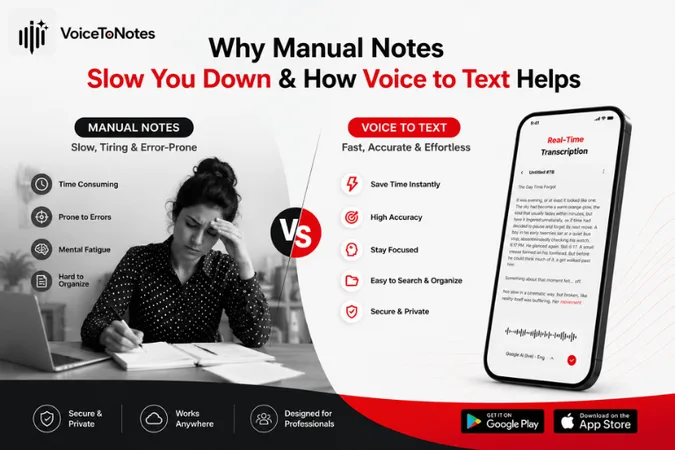
Why Manual Note Taking Slows You Down
When you write by hand or type every word, you have to listen and write at the same time. During fast paced meetings, lectures, or brainstorming sessions, it's easy to miss important points because you're busy trying to keep up.
Your attention keeps shifting between the speaker and your notes. Instead of fully focusing on the conversation, you're often thinking about what to write next. This makes it harder to understand and remember information.
Taking notes can be mentally exhausting. Trying to capture every detail creates unnecessary stress, and you may end up spending extra time organizing or rewriting your notes later.
Why Manual Notes Can Be Inefficient
Here are some common reasons why it can slow you down and affect your productivity.
1. Writing Takes More Time Than Speaking
One of the biggest problems with taking notes by hand is that it is slow.
Most people talk faster than they can write. In meetings or lectures things move quickly. It is hard to write down everything.
As a result you might:
- Miss information
- Write sentences that're not complete
- Miss good points because you are trying to keep up
2. It Divides Your Attention Between Listening And Writing
When you are writing notes your attention goes away from what people're actually talking about.
You are not really listening to what's being said because you are thinking about the notes you are writing. You are thinking about what you should write down and what you can leave out.
You are also thinking about how you can make your notes look neat and easy to understand.
3. Important Details Are Easily Missed
When people talk fast you do not have time to write down everything.
Fast conversations rarely pause for note-taking.
You are still writing down one thing and the speaker is already talking about something else.
Missing details about Important Details can become a bigger problem later when you are reviewing your notes about Important Details.
4. Organizing Notes Takes Extra Time
Writing notes is only the beginning.
You usually have to do things with them later on.
You have to
- Rewrite notes that're hard to read because your handwriting is messy
- Fix mistakes you made when you were typing
- Put points that're all, over the place in order
- Highlight the key points
This means you have to spend more time on your notes. Organizing notes takes time. This extra work could have been avoided if you did things differently with your notes.
5. Writing Down Notes Can Stop Creative Thoughts
Ideas do not always come one at a time.
In brainstorming meetings thoughts come to mind quickly. Stopping to write every idea can break your train of thought.
You end up pausing to note down ideas instead of letting them come naturally.
How Voice-to-Text Helps You Take Notes Faster
Voice to text technology automatically converts your spoken words into written text, allowing you to create notes without typing.
You do not have to type anything. The Voice to Text software makes your notes for you at the same time.
As a result, you can save time, stay focused, and complete your work more efficiently.
How does it help?
1. Write Down Your Ideas Right Away
Your ideas will be gone if you do not write them down.
You can use voice to text so you do not have to stop what you are doing to type something. You simply speak, allowing you to capture thoughts while they're still fresh.
This is really helpful for People Who Write, Students, Researchers and Business professionals.
2. Stay Focused During Meetings
When you are in a meeting, instead of constantly typing, you can pay attention to the conversation.
Voice transcription quickly writes down your words while allowing you to:
- Maintain eye contact with the people you are talking to
- Listen to what they are saying very carefully
- Participate in the discussions that are happening
- Ask questions because you are paying attention
This way you can make notes without getting distracted from the meeting.
3. Improve Productivity
Voice to text helps you complete everyday tasks more efficiently, whether you're creating meeting notes, drafting emails, preparing reports, organizing study notes, or capturing brainstorming ideas. Instead of spending time typing, you can focus on getting your work done.
4. Reduce Hand Fatigue
Writing for a long time can be really uncomfortable.
Students, journalists, researchers and office professionals have to write or type for hours every day.
Voice to text reduces the need for constant typing, helping minimize hand fatigue during long note taking sessions.
Speaking naturally requires much less physical effort, making long note taking sessions more comfortable.
5. Keep Your Thoughts Natural
When people type they usually make sentences short because typing takes a long time.
With voice to text they express their ideas naturally without interrupting their thought process.
The notes they make with voice to text are easy to understand because they closely match how you actually speak.
Voice to text allows ideas to flow naturally without interrupting your thinking. That is really helpful.
Who Should Use Voice to Text?
Voice to text is not just for one type of person. Many people can benefit from it.
Tools like VoiceToNotes.ai make it easy to turn your speech into written text instantly. You can just talk and the app will transcribe it for you.
This way you can pay attention to the person you are talking to or think about your ideas without having to worry about writing everything down.
Here's how different users can benefit from VoiceToNotes.ai:
1. Students
Students can record lectures, summarize lessons and prepare study material quickly. Helps them focus on understanding the material instead of writing everything down.
2. Professionals
Professionals can use it for meeting notes, making documenting project discussions and business ideas easier. Helps reduce manual typing.
3. Content Writers
Content writers can dictate blog ideas, helping them create outlines and drafts much faster. They can focus on creating content instead of typing everything manually.
4. Journalists
Journalists can transcribe interviews quickly. It reduces the time spent replaying recordings. They can focus on writing the story.
5. Researchers
Researchers can record research observations and findings immediately. It helps them maintain focus on their work. They do not have to stop and write everything down.
Is Voice to Text Always Perfect?
Voice to text technology has improved significantly over time but it is not always perfect. Like any technology how well it works depends on the conditions it is used in.
Here are some situations where voice to text may not work well:
- When there is a lot of noise in the background
- When many people are talking at the same time
- When the microphone is not very good
- When people talk fast or are not clear
The good thing is that the tools for voice to text are getting better all the time. If you have a recording with a good microphone they can make transcripts that are very accurate and only need a few small changes.
VoiceToNotes.ai is made to make it easy to transcribe voice to text. It lets users turn spoken words into text quickly and accurately. The platform provides smart formatting and AI generated summaries, making your notes easier to read and organize.
While no transcription tool can guarantee 100% accuracy in every situation, VoiceToNotes.ai helps reduce manual effort by delivering clean, easy-to-read transcripts that require very little editing.
Voice to text technology is still getting better. Every improvement makes it more useful for students, professionals, creators and anyone who wants to save time when taking notes. VoiceToNotes.ai and other voice to text tools are really helpful for people who want to use voice to text to make their work easier.
Manual Notes vs. Voice to Text: A Side by Side Comparison
The table below compares manual note taking with voice to text across several important factors, including speed, focus, organization, and overall efficiency.
| Feature | Manual Notes | Voice to Text |
|---|---|---|
| Speed | Slower because you write or type every word. | Converts speech into text in real time, making note-taking much faster. |
| Focus | Divide your attention between listening and writing. | Lets you stay focused on the conversation while notes are created automatically. |
| Accuracy | Important details can be missed during fast discussions. | Captures more of the conversation, though accuracy depends on recording quality. |
| Productivity | Requires extra time to rewrite, organize, and edit notes. | Saves time by generating ready-to-review transcripts. |
| Creativity | Stopping to write can interrupt your flow of ideas. | Allows you to speak naturally and capture ideas as they come. |
| Hand Fatigue | Long writing or typing sessions can cause discomfort. | Reduces strain by minimizing manual typing. |
| Organization | Notes often need additional formatting and cleanup. | AI-powered tools can organize transcripts with smart formatting and summaries. |
| Best For | Short notes, quick reminders, or personal journaling. | Meetings, lectures, interviews, brainstorming sessions, and detailed note-taking. |
Final Thoughts
Manual note taking has been a way to do things for a long time but it has a hard time keeping up with how fast we work these days. When you have to write everything down by hand or type every word it can really slow you down.
Voice to text is a way to do things. It automatically turns what you say into text and helps you get your ideas down faster. You can also stay focused when you are talking to someone and you don’t have to spend as much time organizing your notes afterwards.
Tools like VoiceToNotes.ai make it even easier. They help you make notes that're accurate, organized and easy to review notes with minimal effort.
Tools like VoiceToNotes.ai make it easier to capture ideas, stay organized, and spend less time on manual note-taking. The future of note taking isn't about writing faster, it's about working smarter.
Frequently Asked Questions (FAQs):
1. Is voice to text faster than typing?
Yes it is. Most people speak faster than they can type, making voice to text helps you capture ideas quickly.
2. Can voice to text replace handwritten notes?
For many tasks, yes it can. Voice to text works well for meetings, lectures and brainstorming sessions.
3. How accurate is voice to text? It is usually very accurate. Just speak clearly, record in a quiet place and get your transcripts.
4. Who can benefit from voice to text?
Students, professionals, writers, journalists, researchers and anyone who takes notes often can benefit.
5. Does voice to text work in noisy places?
It can work, but background noise might make it less accurate. A quiet setting gives results.
6. Do I need to edit the transcript?
Sometimes. Most transcripts just need a review to fix small errors or formatting.
7. Is voice to text useful for meetings?
Yes it is. Voice to text helps capture discussions, action items and important decisions without you typing.
8. Can I use voice to text for study notes?
Absolutely, tools like VoiceToNotes.ai helps students record lectures, summarize lessons and organize study material efficiently with voice to text.
9. Why are more people switching to voice to text?
It saves time, reduces effort and lets people focus on the conversation of taking notes with voice to text.
10. How does VoiceToNotes.ai make note taking easier?
VoiceToNotes.ai converts spoken words into text accurately. This helps users create notes with less manual work using voice to text.
Disclosure: VoiceToNotes is developed by our team and is included in this comparison. To maintain fairness, every product is evaluated using the same review criteria.
.webp)
.webp)