


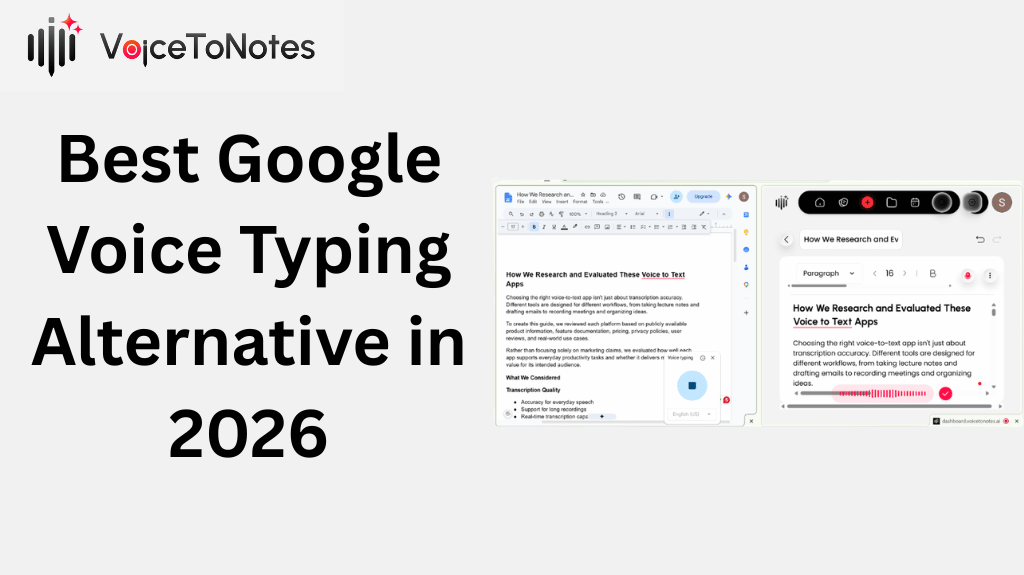
Google Voice Typing is a free built-in dictation tool that works only inside Google Docs and Slides.
It transcribes your speech in real time but leaves you with raw, unformatted text that needs manual cleanup.
VoiceToNotes.ai goes several steps further; it structures your notes, removes filler words, formats your output automatically, and works across every app on your device.
If you want clean, usable text without spending 10 minutes editing after every recording, VoiceToNotes.ai is the better choice.
The Problem With Google Voice Typing
Google Voice Typing works. It is free, it is already on your device, and for quick, casual dictation inside Google Docs it does the job just fine.
But if you have ever finished a three-minute voice note and spent fifteen minutes cleaning it up fixing punctuation, removing "ums," restructuring rambling sentences into something readable then you already know the problem.
Google Voice Typing just listens. It does not think.
VoiceToNotes.ai does both. This comparison breaks down exactly where each tool stands, what real users are saying, and which one actually fits your workflow.
TL;DR At a Glance
VoiceToNotes.ai Best for Power Users
The AI voice-to-notes app that thinks like an editor
✓ Works across every app not just Google
✓ Automatically formats and structures your notes
✓ Removes filler words and fixes grammar on the fly
✓ AI custom prompts reshape notes on command
✓ OCR scanner reads text from images and documents
✓ Freemium Pro plan starts at just $1.49/month
✓ Available on Web, iOS, Android, and Chrome
Google Voice Typing Best Free Option
Simple, built-in dictation for Google's ecosystem
✓ Free with no sign-up needed
✓ Baked into Google Docs and Slides
✓ Supports 100+ languages
✓ Real-time transcription as you speak
✓ Basic voice commands for formatting
✓ Zero setup required
Why You Can Trust Our Testing
We tested Google Voice Typing and VoiceToNotes.ai across real-world productivity tasks instead of relying solely on feature lists or marketing claims.
Our evaluation included everyday workflows such as drafting emails, taking meeting notes, capturing lecture recordings, brainstorming ideas, and creating long-form content.
To make this comparison as practical as possible, we tested both tools across multiple recording scenarios on Android, the web, and desktop workflows.
.png)
Rather than looking only at how accurately each tool converted speech into text, we also measured how much manual editing was required before the final notes were ready to use.
This allowed us to compare not just transcription quality, but the complete productivity experience.
Feature Comparison: VoiceToNotes.ai vs Google Voice Typing
| Feature | Google Voice Typing | VoiceToNotes.ai |
|---|---|---|
| Platform | All devices (Google only) | Web, iOS, Android, Win, Mac |
| Cross-App Use | ✕ Google suite only | ✓ Every app with a text box |
| AI Note Structuring | ✕ None | ✓ Bullets, emails, posts |
| Filler Word Removal | ✕ None | ✓ Removes ums, ahs, repeats |
| Grammar Correction | ⚡ Limited | ✓ Advanced AI correction |
| Custom AI Prompts | ✕ None | ✓ Reshape notes by voice command |
| OCR Image Scanning | ✕ None | ✓ Reads text from photos/docs |
| Action Item Extraction | ✕ None | ✓ Auto to-do lists with checkboxes |
| Note Organisation | ✕ None | ✓ Collections + Daily Journal |
| Multilingual Support | ✓ 100+ languages | ✓ 20+ languages |
| Privacy | Stored in Google ecosystem | Audio deleted after transcription |
| Export Options | Google formats only | PDF, TXT, WhatsApp, Gmail, Drive |
| Daily Limits | Unlimited | Free: 10/day · Pro: Unlimited |
| Cost | Free | Free tier · Pro $1.49/month |
VoiceToNotes.ai The Honest Review
Most voice-to-text tools solve exactly one problem: they turn speech into text. That is where they stop. VoiceToNotes.ai solves the problem after that what do you do with that raw, unformatted block of words?
The answer, inside VoiceToNotes, is: nothing. Because the app already handled it.
When you finish recording, the AI does not hand you a transcript. It hands you a structured document with a summary, a bullet-point breakdown of main ideas, extracted action items, and your original transcript sitting below it for reference. The whole process takes seconds.
✓ What VoiceToNotes.ai Gets Right
✓ Works in every app emails, Slack, Notion, WhatsApp, everything
✓ AI structuring turns messy ramblings into usable content automatically
✓ Custom prompts let you reshape notes with a single sentence ("Make this a professional follow-up")
✓ OCR scanner digitises handwritten or printed text from photos
✓ Audio files are permanently deleted after transcription strong privacy default
✓ Daily journal view and writing streak gamify the habit
✓ Pro tier at $1.49/month genuinely affordable compared to competitors
✓ 1M+ downloads on Google Play widely adopted and actively maintained
✕ Where VoiceToNotes.ai Falls Short
✕ No Chrome extension available
✕ Requires an internet connection for AI features offline use is limited
✕ Free plan caps at 10 notes and 10 AI operations per day
✕ Android battery optimisation settings can interrupt background recording
✕ Fewer languages than Google Voice Typing (20+ vs 100+)
Google Voice Typing The Honest Review
Google Voice Typing earns its place precisely because it asks nothing of you. No app to download, no account to create, no settings to configure. If you are inside Google Docs and you want to speak instead of type, it is just there.
For simple tasks drafting a quick paragraph, dictating a heading, adding notes to a Google Slide it works without friction. But the moment your workflow steps outside Google's walls, or the moment you need more than a raw transcript, it hits a hard wall.
✓ What Google Voice Typing Gets Right
✓ Completely free with no account or download needed
✓ Instant access inside Google Docs and Slides
✓ Real-time transcription with zero lag
✓ Supports 100+ languages best-in-class for multilingual users
✓ Simple voice commands for basic punctuation and formatting
✕ Where Google Voice Typing Falls Short
✕ Locked to Google Docs and Slides only no cross-app dictation
✕ Leaves you with raw, unformatted text every single time
✕ No AI structuring, no summary, no action item extraction
✕ Inconsistent punctuation pausing mid-sentence often breaks flow
✕ Voice formatting commands feel clunky in practice
✕ Accented speech and fast talking reduce accuracy noticeably
The Real-World Test: 3 Minutes of Rambling
During testing, a 3-minute spoken idea for a client email unscripted, with natural pauses and some repetition was recorded in VoiceToNotes.ai with the custom prompt: "Make this a professional email."
The result was 95% ready to send immediately. Total editing time: under 60 seconds.
The same speech tested in Google Voice Typing produced an unformatted wall of text with missing punctuation and three instances of "um" included verbatim. Total editing time: roughly 12 minutes.
⏱ TIME SAVED
In informal testing, VoiceToNotes.ai saved approximately 10–15 minutes of post-edit time per voice note compared to Google Voice Typing on a standard 2–3 minute recording.
VoiceToNotes.ai Testing Scores
Transcription Accuracy 9.5 / 10
Ease of Use 10 / 10
AI Formatting Quality 9 / 10
Privacy & Security 9.5 / 10
Value for Money 10 / 10
What Real Users Are Actually Saying
We went beyond the marketing page and pulled feedback from Google Play, G2, and community forums. Here is the unfiltered picture:
"The best app I've ever used. It has a great, user-friendly design and its answers are accurate, logical, and not random."
Lolo Lolo, Google Play Store · November 2025 (50 people found this helpful)
"This is more than a note-taker now it's a productivity hub. After a live sales call, I take the transcript and use the Custom Prompt to say 'Draft a professional follow-up email summarising these action items.' It takes 30 seconds."
Sales professional, VoiceToNotes.ai review page
"My brain-to-blog-post pipeline is now under 10 minutes. Just hit the Blog button, talk, and use the Enhance tool to polish. Done."
Content creator, VoiceToNotes.ai review page
The One Consistent Warning From Reviews
G2 reviewers and Reddit threads in r/notetaking flag the Chrome extension as unreliable for long recordings. Multiple users reported losing 45–60 minute meeting recordings with no audio saved. This is specific to the Chrome extension, not the web app or mobile app, which both receive much stronger feedback.
Practical advice from the community: use the mobile app or web app for any recording you cannot afford to lose.
Pricing
Google Voice Typing
✓ Free always
✓ Unlimited dictation in Google Docs and Slides
✓ 100+ language support
✓ No AI formatting or structuring
VoiceToNotes.ai Starter (Free)
✓ 10 voice notes per day
✓ 10 AI operations per day
✓ 3 OCR scans per day
✓ No credit card required
VoiceToNotes.ai Pro ($1.49/month or $12.99/year)
✓ Unlimited voice notes
✓ Unlimited AI operations
✓ Unlimited OCR scans
✓ AI structuring, summaries, action items
✓ Custom AI prompts
✓ Cross-platform sync
*Pricing may have changed since publication. Verify current rates at voicetonotes.ai before upgrading.
Who Should Use Which Tool
🎓 Students
VoiceToNotes.ai lecture summaries, essay outlines, and structured study notes in under a minute.
VoiceToNotes.ai turn meeting ramblings into follow-up emails and Jira tickets using custom prompts.
VoiceToNotes.ai speak your draft, hit "Blog," and have a structured post ready to polish in minutes.
📄 Casual Google Docs Users
Google Voice Typing if you only need quick, occasional dictation inside Docs and don't care about formatting, it's perfectly fine and free.
🌐 Multilingual Users
Google Voice Typing wins here 100+ languages versus VoiceToNotes.ai's 20+. Check if your language is supported before switching.
🔒 Privacy-Conscious Users
VoiceToNotes.ai audio deleted after transcription, no forced cloud uploads, no AI training on your recordings.
Who Should Skip VoiceToNotes.ai
It is excellent for most users but not for everyone:
→ You only need a voice keyboard for short searches or quick messages
→ You work entirely offline and need transcription without internet
→ You dislike AI-generated summaries and want only raw transcripts
→ You regularly record long team meetings and need speaker identification
→ You need clinical or highly technical documentation specialised tools perform better
Frequently Asked Questions
Q: Is VoiceToNotes.ai actually better than Google Voice Typing?
For most users, yes significantly. Google Voice Typing transcribes speech accurately within Google Docs but does nothing with the output. VoiceToNotes.ai structures, formats, and organises your notes automatically using AI, and works across every app on your device, not just Google's suite.
Q: Does VoiceToNotes.ai work offline?
The core recording works locally on your device, but AI formatting, summaries, and custom prompts require an active internet connection. If you are regularly in areas without connectivity, Google Voice Typing may be more reliable for offline use.
Q: What languages does VoiceToNotes.ai support?
VoiceToNotes.ai supports over 20 languages including English, Hindi, Japanese, Chinese, and Korean. If you need support for less common languages, Google Voice Typing's 100+ language library is the stronger option.
Q: Is the free plan actually usable?
Yes the Starter plan includes 10 voice notes, 10 AI operations, and 3 OCR scans per day for free with no credit card required. For heavy daily use, the Pro plan at $1.49/month removes all limits.
Q: Is VoiceToNotes.ai safe for private notes?
VoiceToNotes.ai permanently deletes audio files from their servers immediately after transcription. Your recordings are not used to train AI models and are not backed up to the cloud unless you actively choose to sync.
Q: Can I use VoiceToNotes.ai on iPhone and Android?
Yes. VoiceToNotes.ai is available natively on the App Store (iOS), Google Play Store (Android), and via the web. It syncs your notes across all three platforms.
Is there a better alternative to Google Voice Typing?
Yes. If you need more than basic speech-to-text, VoiceToNotes.ai is one of the best Google Voice Typing alternatives. It offers AI-powered note formatting, grammar correction, summaries, OCR image scanning, and works across multiple platforms instead of being limited to Google Docs.
What is the best alternative to Google Speech-to-Text?
Several apps can replace Google Speech-to-Text depending on your needs. Popular alternatives include VoiceToNotes.ai, Otter.ai, Fireflies.ai, Krisp, and Notta. If you want AI-powered note organization, automatic summaries, and cross-platform support, VoiceToNotes.ai is a strong choice.
Which is the best app for voice typing?
The best voice typing app depends on your workflow. Google Voice Typing is ideal for free dictation inside Google Docs, while VoiceToNotes.ai is better for users who want AI transcription, smart formatting, OCR scanning, summaries, and organized notes across web, Android, and iPhone.
Can I use my keyboard instead of Google Voice Typing?
Yes. You can switch between voice input and your keyboard at any time. If you prefer typing manually, simply disable voice typing and continue using your device's keyboard. If your goal is more advanced voice transcription rather than keyboard input, an app like VoiceToNotes.ai offers additional AI features beyond basic dictation.
Is Google Voice Typing free?
Yes. Google Voice Typing is completely free to use inside Google Docs and Google Slides. However, it only provides basic speech-to-text transcription. If you need AI summaries, note organization, OCR scanning, and advanced formatting, VoiceToNotes.ai offers those features through both free and Pro plans.
Does VoiceToNotes.ai work better than Google Voice Typing?
For most users, yes. Google Voice Typing is designed for simple dictation, whereas VoiceToNotes.ai combines AI transcription, grammar correction, note organization, OCR scanning, custom prompts, and automatic summaries into one workflow. This reduces the amount of manual editing required after recording.
Final Verdict
VoiceToNotes.ai wins.
Google Voice Typing is a fine free tool for users who live inside Google Docs. But for anyone who wants to dictate faster, format smarter, and stop spending half their day cleaning up transcripts VoiceToNotes.ai is the clear upgrade. At $1.49/month for the full Pro plan, it is also one of the most affordable AI productivity tools available today.
Disclosure: VoiceToNotes is developed by our team and is included in this comparison. To maintain fairness, every product is evaluated using the same review criteria.
.webp)
.webp)